
 Log in
The Right Way to Recharge Coins on TikTok: Web vs the TikTok App
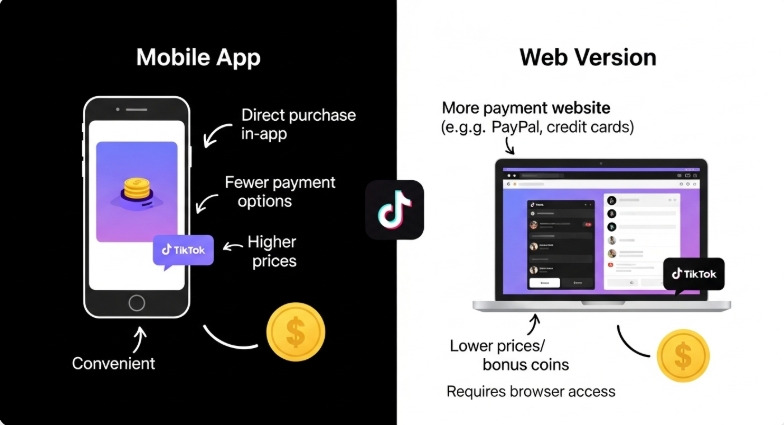
TikTok Coins have become an essential part of engaging with creators on the platform, whether through LIVE gifts or supporting favorite content. Knowing the right way to Recharge Coins can save money, reduce failed payments, and make gifting seamless.
Understanding the differences between recharging coins via the TikTok mobile app and TikTok Web, as well as how a virtual payment solution like Bycard can simplify purchases, enhance security, and provide better control over spending, ensures that every coin purchase is smooth and efficient. You’ll also find actionable tips and troubleshooting insights to avoid common issues with TikTok coin top-ups.
- The Right Way to Recharge Coins on TikTok: Web vs the TikTok App
- What TikTok Coins Are and How They’re Used
- Buying TikTok Coins Inside the Mobile App
- Purchasing Coins Through TikTok’s Website
- TikTok Website vs Mobile App: What Actually Changes
- Why Payments Fail or Coins Don’t Appear
- How Pricing Changes by Country and Currency
- Using Virtual Cards for Coin Purchases
- What Happens After Coins Are Added to Your Wallet
- Choosing the Right Option Based on How You Use TikTok
What TikTok Coins Are and How They’re Used
TikTok Coins are virtual credits used to send gifts during LIVE streams. When you Recharge Coins, you’re adding these credits to your TikTok wallet so you can support creators in real time.
Coins don’t exist outside TikTok, can’t be transferred between accounts, and generally aren’t refundable. That’s why understanding the process before you Recharge Coins matters, especially for users who gift frequently.
Key things to know:
- Coins are tied to your TikTok account, not your device
- Recharge Coins pricing varies by platform and region
- Payment success depends on how you choose to recharge
- Once used, coins cannot be reversed
Buying TikTok Coins Inside the Mobile App
Many users first attempt to Recharge Coins directly in the TikTok app because it’s quick and familiar.
How in-app purchases work
When you buy coins in the app, payments are processed through Apple App Store or Google Play. TikTok doesn’t handle the transaction directly.
Steps usually look like this:
- Open the TikTok app
- Go to your profile
- Tap “Balance”
- Select a coin package
- Confirm payment via your app store
What to expect when you Recharge Coins in the app
- Higher prices due to platform fees
- Limited payment flexibility
- Card declines for some international users
- Less visibility into exchange rate adjustments
For occasional gifting, in-app Recharge Coins works fine. For frequent use, these limitations become more noticeable.
Purchasing Coins Through TikTok’s Website
TikTok also allows users to Recharge Coins through its official website, a method many people overlook.
When you recharge via TikTok Web:
- TikTok processes payments directly
- App store fees are bypassed
- Pricing is often lower for the same coin bundles
How to recharge on TikTok Web
- Visit TikTok’s official website
- Log into your account
- Navigate to “Coins” or “Balance”
- Choose a bundle
- Complete payment
For users who Recharge Coins regularly, the web option is often more cost-effective and more reliable.
TikTok Website vs Mobile App: What Actually Changes
Here’s a practical comparison of what changes when you Recharge Coins on different platforms:
| Aspect | TikTok App | TikTok Web |
| Cost | Higher due to platform fees | Potentially lower (no app store fee) |
| Card Support | Depends on store policies | Wider acceptance (Visa/Mastercard/PayPal) |
| Reliability | More declines for international cards | Better success rates |
| Transparency | Limited price visibility | Clear checkout pricing |
This difference is why many users switch methods after their first few coin purchases.
Why Payments Fail or Coins Don’t Appear
One of the most common searches around Recharge Coins involves failed payments or missing balances.
If your Recharge Coins payment failed
- Try recharging via TikTok Web instead of the app
- Check that your card allows online and international payments
- Disable VPNs during checkout
- Confirm your app store billing details
If coins were charged but not added
- Log out and back into your TikTok account
- Check your Balance section, not just LIVE screens
- Wait up to 24 hours before contacting support
When a payment fails in the TikTok app, switching to web checkout often helps. Add a virtual card number and payment passes through as a standard card transaction.
How Pricing Changes by Country and Currency
TikTok does not use a single global price for recharge Coins. Pricing is influenced by:
- Local currency exchange rates
- App store regional fees
- Tax and regulatory costs
- Payment processor charges
When users recharge coins in the app, currency conversion may happen twice, once by the app store and again by the card issuer. TikTok Web often reduces this friction, which explains why web prices feel more consistent.

Perfect Card for running ads!
Using Virtual Cards for Coin Purchases
One of the biggest headaches users report when they try to Recharge Coins is card declines, unwanted charges, or security worries. That’s where a virtual card solution like Bycard can help, especially if you plan to use TikTok frequently or manage a budget for gifting or campaigns.
What Bycard Offers
Bycard is a virtual credit card platform trusted by thousands of users worldwide for secure online payments and better spend control. With Bycard, you can generate dedicated virtual cards in minutes that work on Visa/Mastercard networks and are accepted globally.
Key features include:
- Instant card issuance: start paying immediately without waiting for a physical card
- Multi-currency support: pay in the currency that best matches your coin pricing
- Fraud protection and budget control: set spending limits or lock/unlock cards at any time
- Expense tracking and exports: helps you reconcile your TikTok spending easily
- Wide merchant acceptance: use for TikTok web recharge and other online payments without extra friction
These features make it easier to Recharge Coins securely and avoid the common pitfalls of using personal credit cards for frequent digital spends.
What Happens After Coins Are Added to Your Wallet
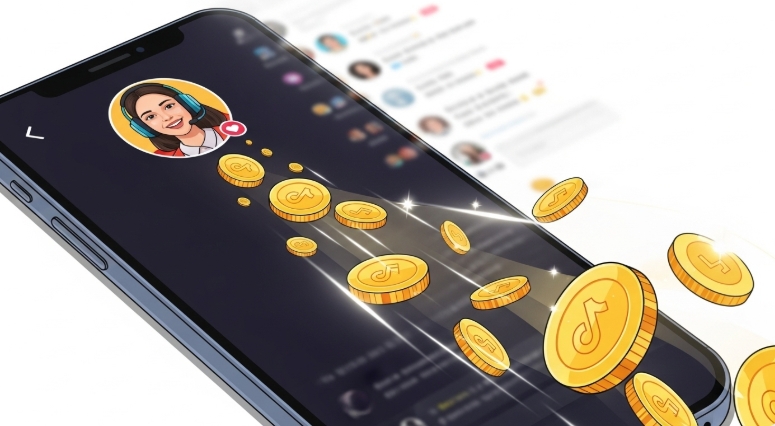
Once you Recharge Coins, they appear in your TikTok wallet and remain there until used. Coins do not expire, but they also cannot be withdrawn or refunded.
You can:
- View your coin balance in your profile
- Track usage through gifting history
- Use coins only within TikTok’s ecosystem
Knowing this helps users recharge coins with clearer expectations and fewer surprises.
Choosing the Right Option Based on How You Use TikTok
The best way to Recharge Coins depends on your usage pattern.
- Occasional gifting → Mobile app is convenient
- Frequent gifting → TikTok Web saves money
- International users → Web usually has fewer declines
- Price-conscious users → Web offers better transparency
Matching your recharge method to how you use TikTok leads to fewer issues over time.
Conclusion
Choosing how to Recharge Coins on TikTok isn’t just about clicking a button, it’s about finding a gateway that’s cost-effective, secure, and suited to how you engage with the platform. Whether you’re supporting creators, managing budgets for campaigns, or just want peace of mind during checkout, understanding your options helps you spend smarter.
With solutions like Bycard in your toolkit, you can reduce declines, control spend, and make coin purchases that fit your financial plan effortlessly.

CATEGORIES
Wise or Revolut? Comparing the Best Multi-Currency Card

Wise Alternatives That Make Payment Faster and Currency Conversion Simple
Wire Transfer vs Bank Transfer for Better & Swift Business Payments

Why Travel Rewards Credit Cards are Highly Important

Why the Ramp Card Might Be the Best Business Card

Why Sales and Discounts Make You Overspend
